
Setting up the Blue App (HealAdvisor Analyse)
 The Blue app or HealAdvisor Analyse app holds space for the Resonance Analysis, MagHealy analysis, Database analysis, Aura Analysis and Coaching Analysis.
- The HealAdvisor Analyse App can be downloaded from your App store.
- In the back office > TOOLS > ACADEMY > LOGIN > PRODUCTS > HEALADVISOR ANALYSE APP has a series of training videos here.
- Resonance Manual has loads of screen shots and is easy to follow if you prefer learning that way. Found in the back office > TOOLS > MY DOWNLOADS and also in the app under SETTINGS (the cog symbol, bottom right) > Manual
- You must have your healy turned on first.
- Follow the prompts, and let your healy connect via bluetooth. Enter the email address and password you signed up with.
- A 6 digit verification code will be sent to the email address you signed in with. Copy and paste it into the app. The code is valid for 10 minutes, you can request a second verification code if required.
The benefits and best practice for migrating to the new app are here.
This video covers almost everything you would want to know about setting up the resonance app including migrating from old blue dot app or the beta version, the new single sign on process, the new subscription plan and usage, turning on advanced settings to record frequencies, adding a client, module improvements and much more!
What’s in advanced settings?
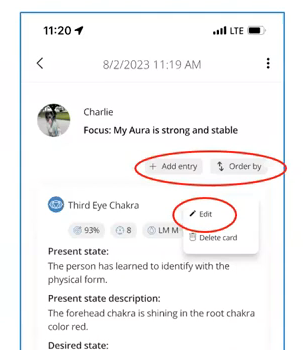
- chakra analysis result quantities
- sorting analysis parameters
- negative relevancies (chakras)
- edit mode for analysis lists (chakras)
- new database entries (adding rifes, affirmations)
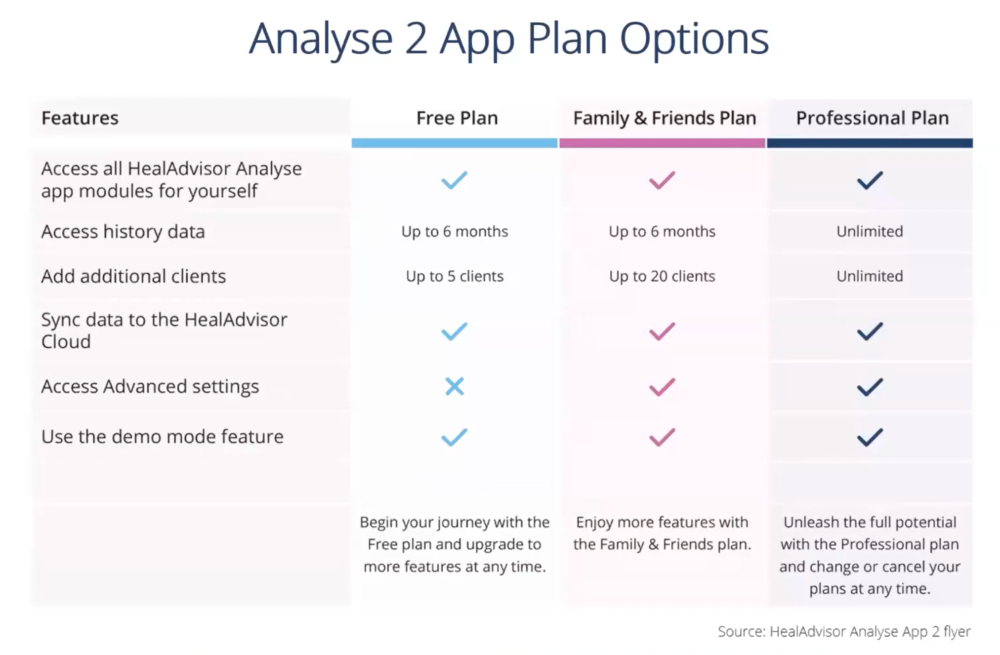
Subscriptions
Please check your shop for subscription prices if you are outside of NZ. If you miss the opportunity to select your preferred plan within the free 6 month trial period, you will automatically be assigned to the Free plan. You are welcome to upgrade to your choice of plan at any time through your Healy Shop.
What If I Downgrade My Plan?
- Downgrade from the Professional to the Family & Friends plan: Only your 20 newest clients will be active, the rest will be inactive.
- Downgrade from the Professional or Family & Friends to the Free plan: All data will stay in the cloud for up to 2 years and will be reactivated if you upgrade within that period.
Support
- Join The Facebook resonance page.
- If you have questions or need help with the setup, check with your sponsor or ask me, most things are easy fixes.
- When to put a support ticket in – After you have searched the team facebook page, the Healy help centre, and checked with your sponsor or me. Then if you can’t find the answer you need or you have something missing from an order raise a SUPPORT TICKET in MY SUPPORT in your back office.